---
title: Content that lasts
description: How education managers turn congress videos into year-round learning — from CME tracking to topic clusters. More impact, less effort.
image: https://news.meta-fusion.com/hubfs/%C3%84rztin_mit_iPad.png
---
[](https://www.meta-fusion.com)
[](https://www.meta-fusion.com)
[](https://news.meta-fusion.com/)
**Get a quote: sales@meta-fusion.com**
[Showcase](https://events.meta-fusion.com/showcase-form)
[Showcase](https://events.meta-fusion.com/showcase-form)
More results
- Solutions
- [Congress Digitalization](https://www.meta-fusion.com/congress-content-digitalization)
- [Meeting & Event Webcast](https://www.meta-fusion.com/meeting-and-event-webcast)
- [Webinars](https://www.meta-fusion.com/webinars)
- [365 video platform](https://www.meta-fusion.com/365-video-platform)
- [»smart video library«](https://www.meta-fusion.com/video-library)
- [Meeting Content Video Player](https://www.meta-fusion.com/video-player)
- [Small Associations](https://www.meta-fusion.com/video-library-for-societies)
- [Professional Congress Organiser](https://www.meta-fusion.com/video-library-for-pcos)
- [AV Provider](https://www.meta-fusion.com/video-library-for-av-suppliers)
- Products
- [All Products](https://events.meta-fusion.com/webcast-and-publishing-products)
- [On-Site Video Production](https://events.meta-fusion.com/on-site-video-production)
- [Virtual Meeting & Webinar Production](https://events.meta-fusion.com/virtual-remote-production)
- [Live Streaming](https://events.meta-fusion.com/live-streaming)
- [On-demand Webcast](https://events.meta-fusion.com/on-demand-webcast)
- [Overflow & Digital Signage](https://events.meta-fusion.com/overflow-signage)
- [365-video Platform](https://www.meta-fusion.com/365-video-platform)
- [Smart Video Library](https://www.meta-fusion.com/video-library)
- [Congress Website](https://events.meta-fusion.com/congress-website)
- [Webcast Microsite](https://events.meta-fusion.com/webcast-microsite)
- [Webcast Widget Hub](https://events.meta-fusion.com/webcast-widget-hub)
- [Webinar Hub](https://events.meta-fusion.com/webinar-hub)
- Pricing
- [Webcast and Services](https://www.meta-fusion.com/webcast_services_pricing)
- [References](https://www.meta-fusion.com/references)
- Resources
- [Blog](https://news.meta-fusion.com/blog)
- Company
- [Contact](https://www.meta-fusion.com/contact)
- [Team](https://www.meta-fusion.com/team)
- Exhibitions and Events
- [Zukunftsforum Medizinkongress](https://events.meta-fusion.com/zukunftsforum-medizinkongress)
- [IBTM 2025](https://events.meta-fusion.com/ibtm-2025)
- [Backstage with meta-fusion](https://www.meta-fusion.com/backstage-at-a-congress)
- [IMEX 2026](https://www.meta-fusion.com/imex-2026)
Get in touch: [info@meta-fusion.com](mailto:info@meta-fusion.com)
[Contact](https://www.meta-fusion.com/contact)
- Solutions
### Solutions for Your Webcast and Video Content
#### Webcast Production
[Congress Content Digitalization](https://www.meta-fusion.com/congress-content-digitalization)
[Meeting & Event Webcast](https://www.meta-fusion.com/meeting-und-event-webcast)
[Webinars](https://www.meta-fusion.com/webinars)
#### **Video Publishing**
[365 Video Platform](https://www.meta-fusion.com/365-video-platform)
[smart video library](https://www.meta-fusion.com/video-library)
[Meeting Content Video Player](https://www.meta-fusion.com/video-player)
#### Branch of Business Solutions
[Small Associations & Societies](https://www.meta-fusion.com/video-library-for-societies)
[Professional Congress Organiser](https://www.meta-fusion.com/video-library-for-pcos)
[AV Provider](https://www.meta-fusion.com/video-library-for-av-suppliers)
---
Get access to our [showcase ](https://events.meta-fusion.com/showcase-form)
- [Products](https://events.meta-fusion.com/webcast-and-publishing-products)
### Product Overview Production & Publication
### **Production**
- [On-Site Video Production](https://events.meta-fusion.com/on-site-video-production)
- [Live Streaming](https://events.meta-fusion.com/live-streaming)
- [On-Demand Webcast](https://events.meta-fusion.com/on-demand-webcast)
- [Overflow & Digital Signage](https://events.meta-fusion.com/overflow-signage)
- [Virtual Meeting & Webinar Production](https://events.meta-fusion.com/virtual-remote-production)
### **Publication**
- ##### Event Publication
- [Congress Website](https://events.meta-fusion.com/congress-website)
- [Webcast Microsite](https://events.meta-fusion.com/small-meeting-microsite)
- [Smart Video Library](https://www.meta-fusion.com/video-library)
- [Webcast Widget Hub](https://events.meta-fusion.com/multichannel-project)
- ##### Community Communication
- [365-Video-Platform](https://www.meta-fusion.com/365-video-platform)
- [New Design Look](https://events.meta-fusion.com/new-design)
- [Webinar Hub](https://events.meta-fusion.com/webinar-hub)
- [Webcast Widget Hub](https://events.meta-fusion.com/multichannel-project)
[--- See All Products](https://events.meta-fusion.com/webcast-and-publishing-products)
- Pricing
- [Webcast and Services](https://www.meta-fusion.com/webcast_services_pricing)
- [References](https://www.meta-fusion.com/references)
- [CIRSE Reference](https://events.meta-fusion.com/cirse-webcast-international-congress)
- [ECR Reference](https://events.meta-fusion.com/european-society-of-radiology-webcast-international-congress)
- [UEG Reference](https://events.meta-fusion.com/ueg-live-webcast)
- [ESAIC Reference](https://events.meta-fusion.com/esaic-webcast-and-platform-full-service)
- [National Societies Case Study](https://events.meta-fusion.com/video-library-for-national-societies)
- [EASL Reference](https://events.meta-fusion.com/easl-webcast-and-platform-full-service)
- Resources
- [Blog](https://news.meta-fusion.com/blog)
- Company
- [Contact](https://www.meta-fusion.com/contact)
- [Team](https://www.meta-fusion.com/team)
- Exhibitions and Events
- [Zukunftsforum Medizinkongress](https://events.meta-fusion.com/zukunftsforum-medizinkongress)
- [IBTM 2025](https://events.meta-fusion.com/ibtm-2025)
- [Backstage with meta-fusion](https://www.meta-fusion.com/backstage-at-a-congress)
- [IMEX 2026](https://www.meta-fusion.com/imex-2026)
[Video Platform](https://news.meta-fusion.com/blog/tag/video-platform)
# Content that lasts
[](https://news.meta-fusion.com/blog/author/britta-von-oeynhausen)
by [Britta von Oeynhausen](https://news.meta-fusion.com/blog/author/britta-von-oeynhausen)
3 min read
Jun 23, 2026, 12:01:12 PM
Video first! All social media channels are leading the way, and even LinkedIn has once again integrated a video feed. Videos no longer just captivate teenagers with TikTok or Reels; to be perfectly honest, I’m no different – videos have my attention. So why not make permanent use of conference videos to capture the interest of association members? And not just once, but throughout the whole year. In this blog post, I’ll give you a few tips that will lead to more meaningful and effective interaction with your members and congress attendees.
## A conference that lasts
Recorded videos of presentations give the conference a longer shelf life – they solve the problem of fleeting attention, as content can be accessed at one’s own pace, repeatedly and at a later date after the conference.
Slide-by-slide navigation plus on-demand access means full control over the pace, repeatability and the ability to jump to specific sections – exactly what a spoken presentation lacks. The slide-by-slide structure is, in effect, segmentation, and learner-driven segmentation is a well-established principle of effectiveness.
## Content
[Make the videos of the conference presentations available for citation](https://news.meta-fusion.com/blog/content-that-lasts#Citation)
[Sharing on social media](https://news.meta-fusion.com/blog/content-that-lasts#Sharingonsocialmedia)
[Get more reach for your on-demand videos](https://news.meta-fusion.com/blog/content-that-lasts#Getmorereach)
[Summarise it into one broad topic](https://news.meta-fusion.com/blog/content-that-lasts#Summarise)
[Add slides to favourites](https://news.meta-fusion.com/blog/content-that-lasts#slidestofavourites)
[Link to your own learning content within your platform](https://news.meta-fusion.com/blog/content-that-lasts#LintoexternalContent)
[Offer your members CME credits](https://news.meta-fusion.com/blog/content-that-lasts#CMEcredits)
## Make the videos of the conference presentations available for citation
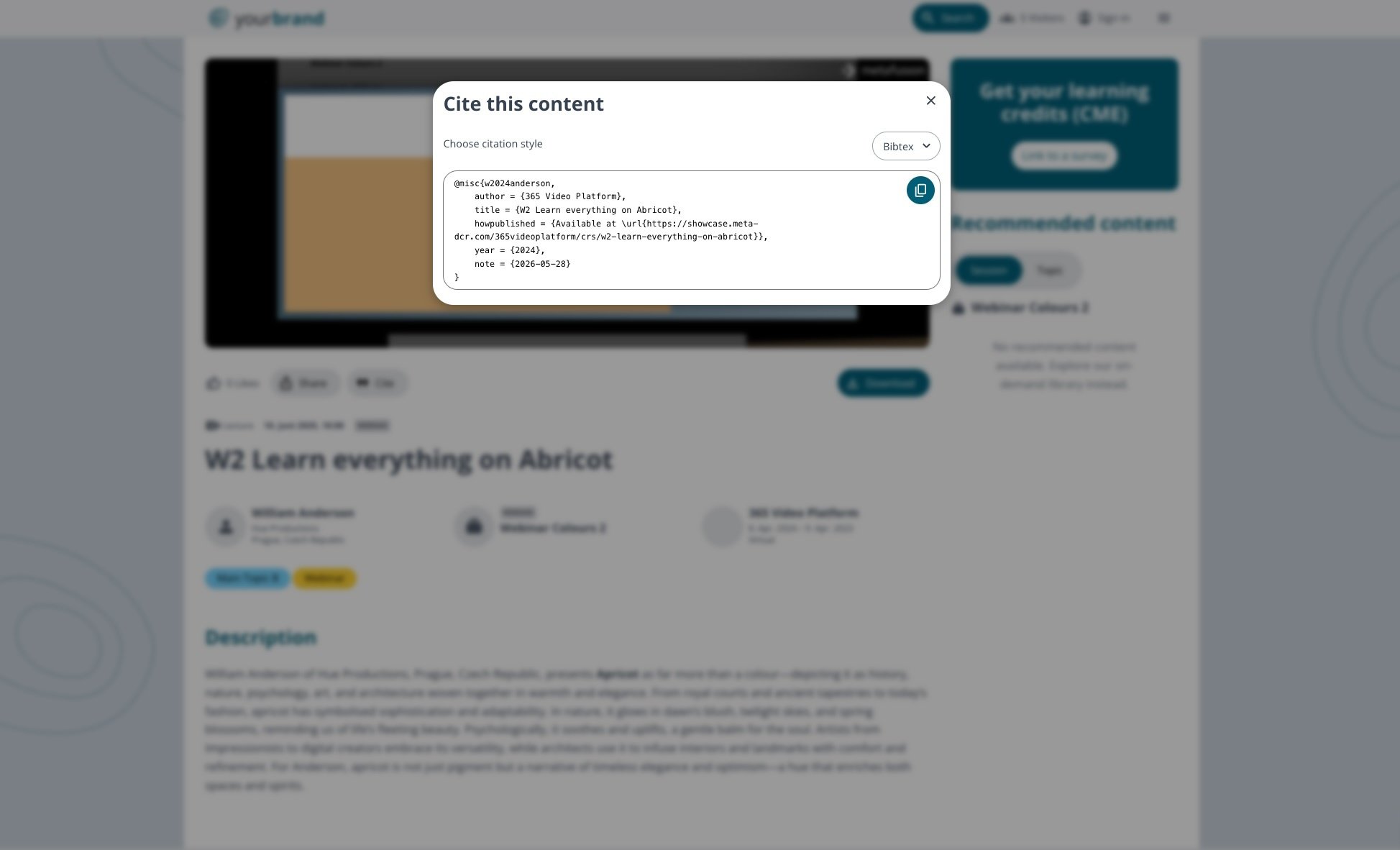
A citation function, which allows conference content to be incorporated into academic papers, makes it far more valuable. The citation function can generate citations in both BibText and plain text, depending on where the citation is to be used.
[Try the citate function](https://events.meta-fusion.com/showcase-form)
## Sharing on social media
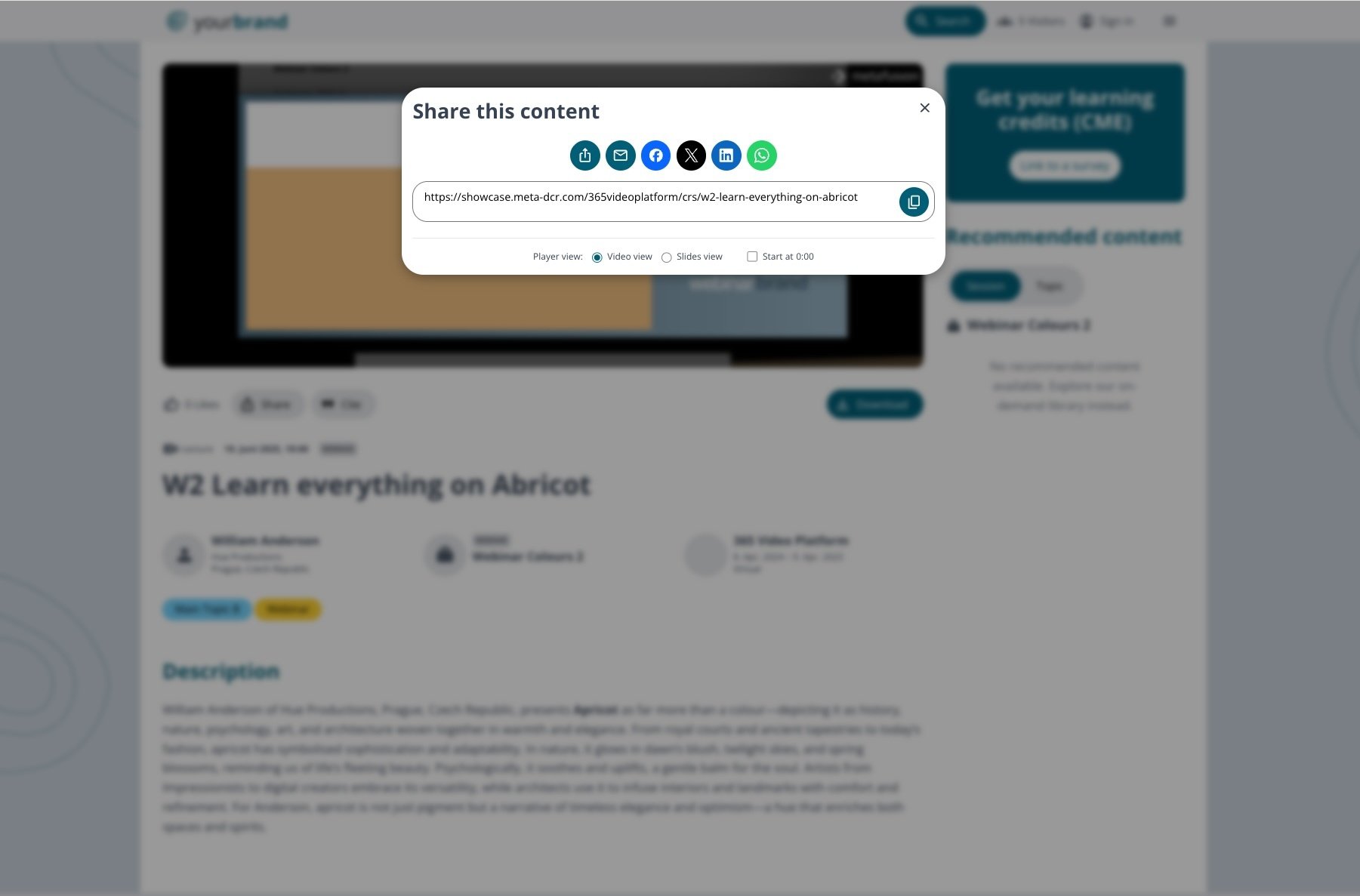
Share selected videos directly via LinkedIn or WhatsApp and add a comment. This helps the video gain more views, more engagement and, overall, greater reach. Sharing also means that people outside the professional association become aware of it, thereby expanding the community.
[Try the sharing function](https://events.meta-fusion.com/showcase-form)
## Get more reach for your on-demand videos
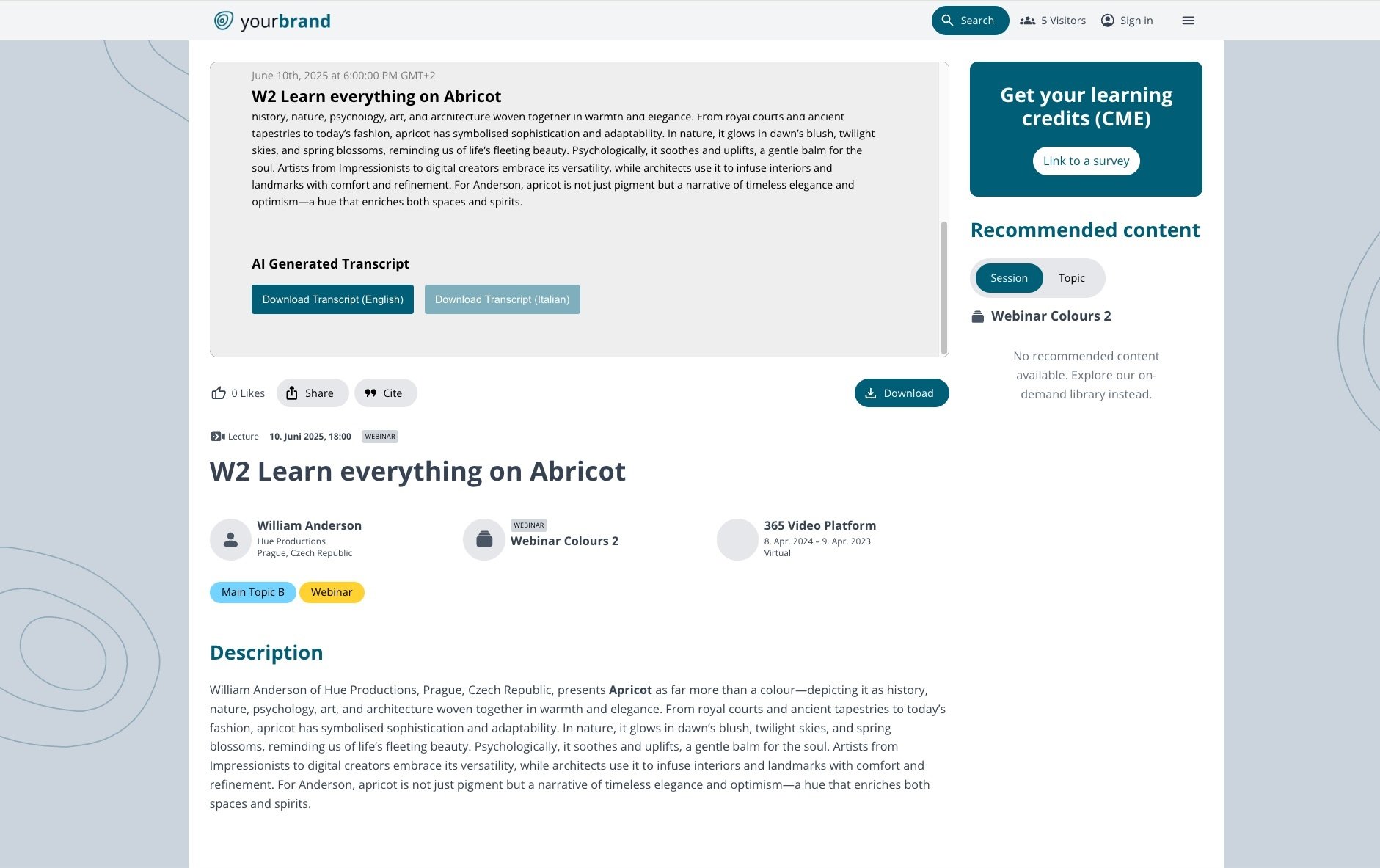
The video can be watched with subtitles in the viewer’s preferred language. This gives all participants easy access to the content. A transcript can also be downloaded. This can then be used for reference or for further work. Passages of text can be copied and used as quotations.
[See the subtitle and transcript](https://events.meta-fusion.com/showcase-form)
## Summarise it into one broad topic
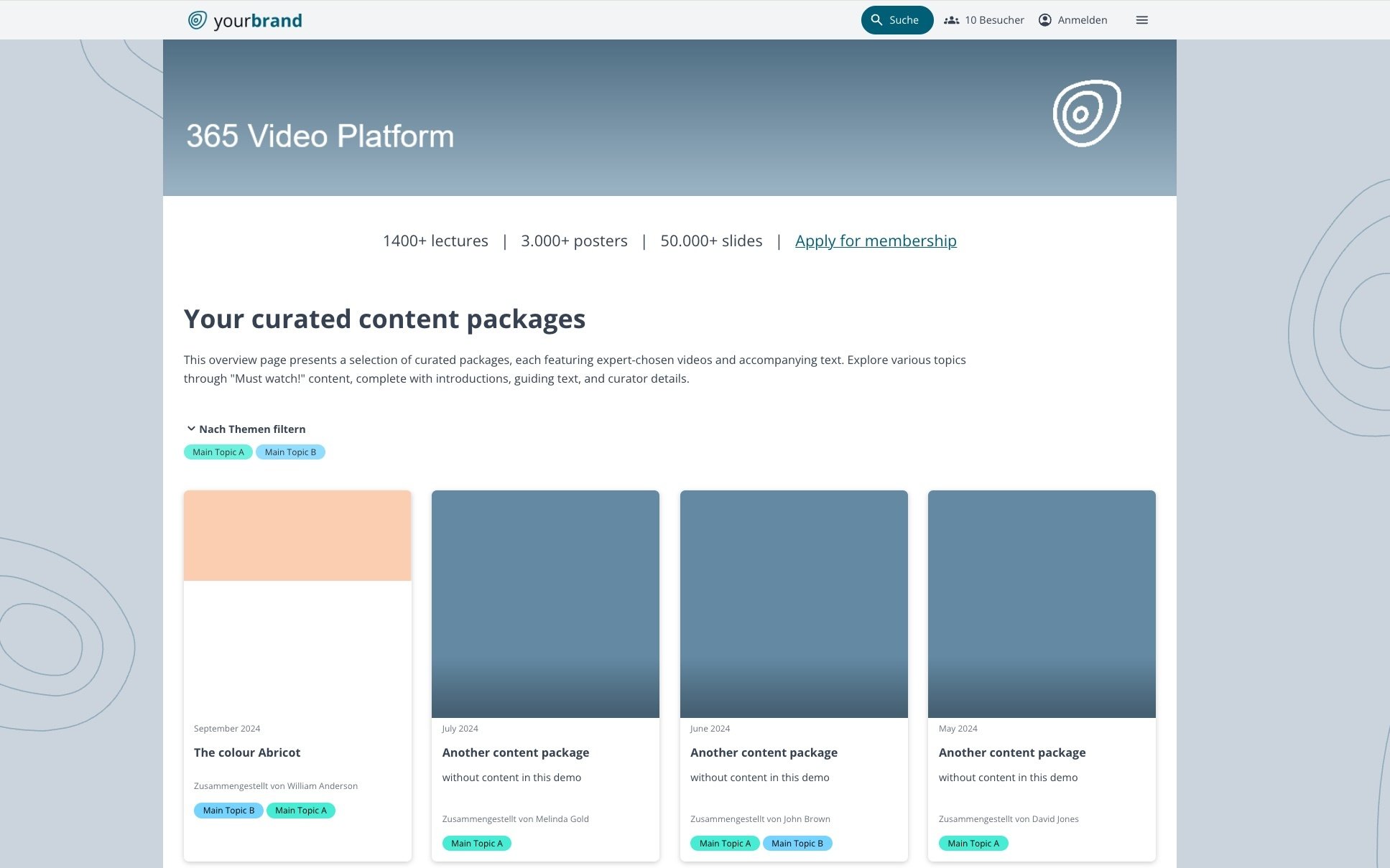
When presented in a structured way and already grouped into thematic clusters, learning becomes much more appealing and, above all, saves time, as users do not have to laboriously gather all the information on a topic themselves.
[See the content packages](https://events.meta-fusion.com/showcase-form)
## Add slides to favourites
The platform features a ‘Save’ function that allows you to revisit content later for study purposes. You can add individual slides or even entire videos to your favourites. This allows you to build your own personal library of the most interesting conference content. However, the videos can only be used effectively for revision and learning if there is direct access to individual pieces of content (slides). As well as slides, users can also save entire videos or sessions. This ensures that users have their most important content available at a glance.
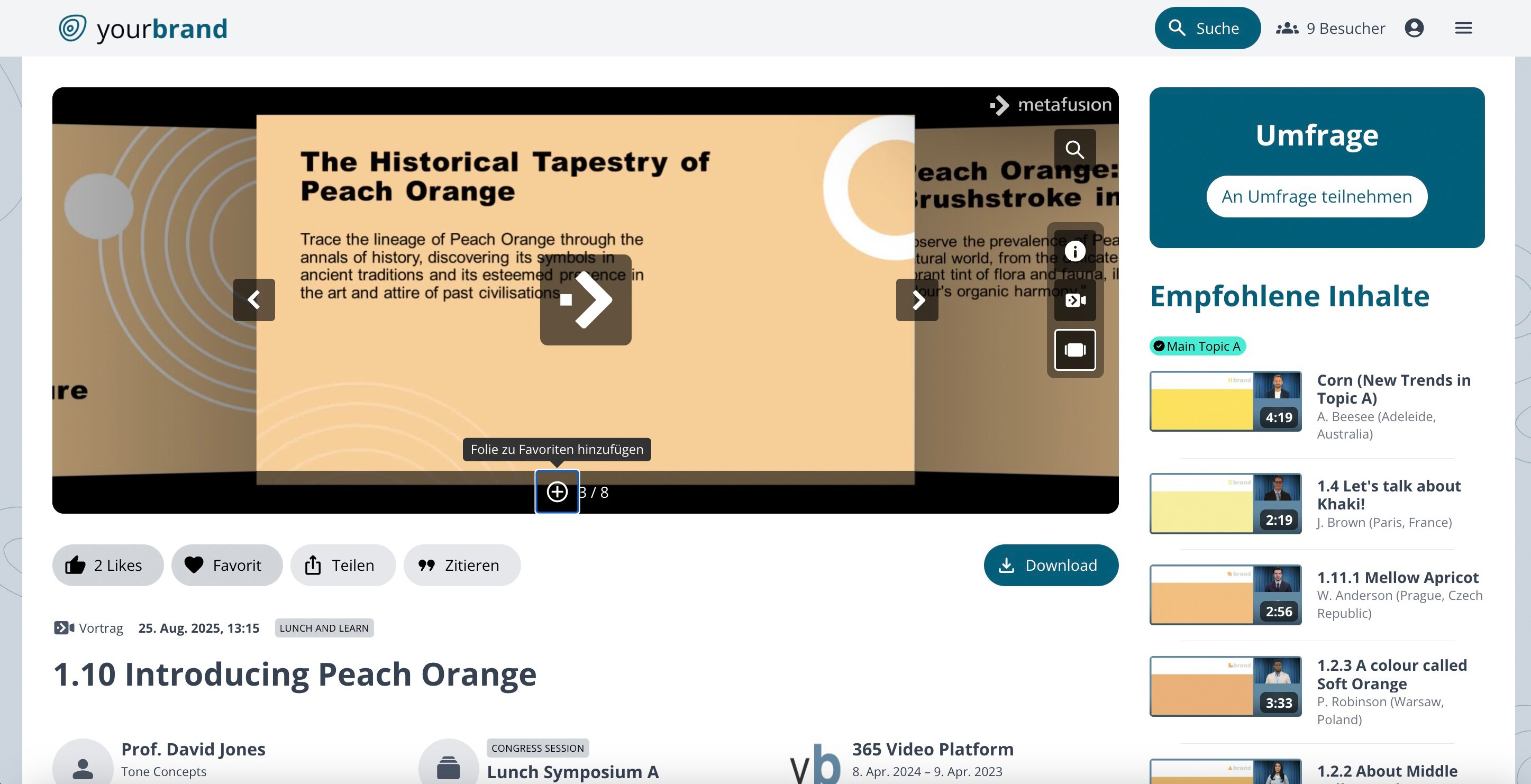
Add slides, videos or posters to your favourites.
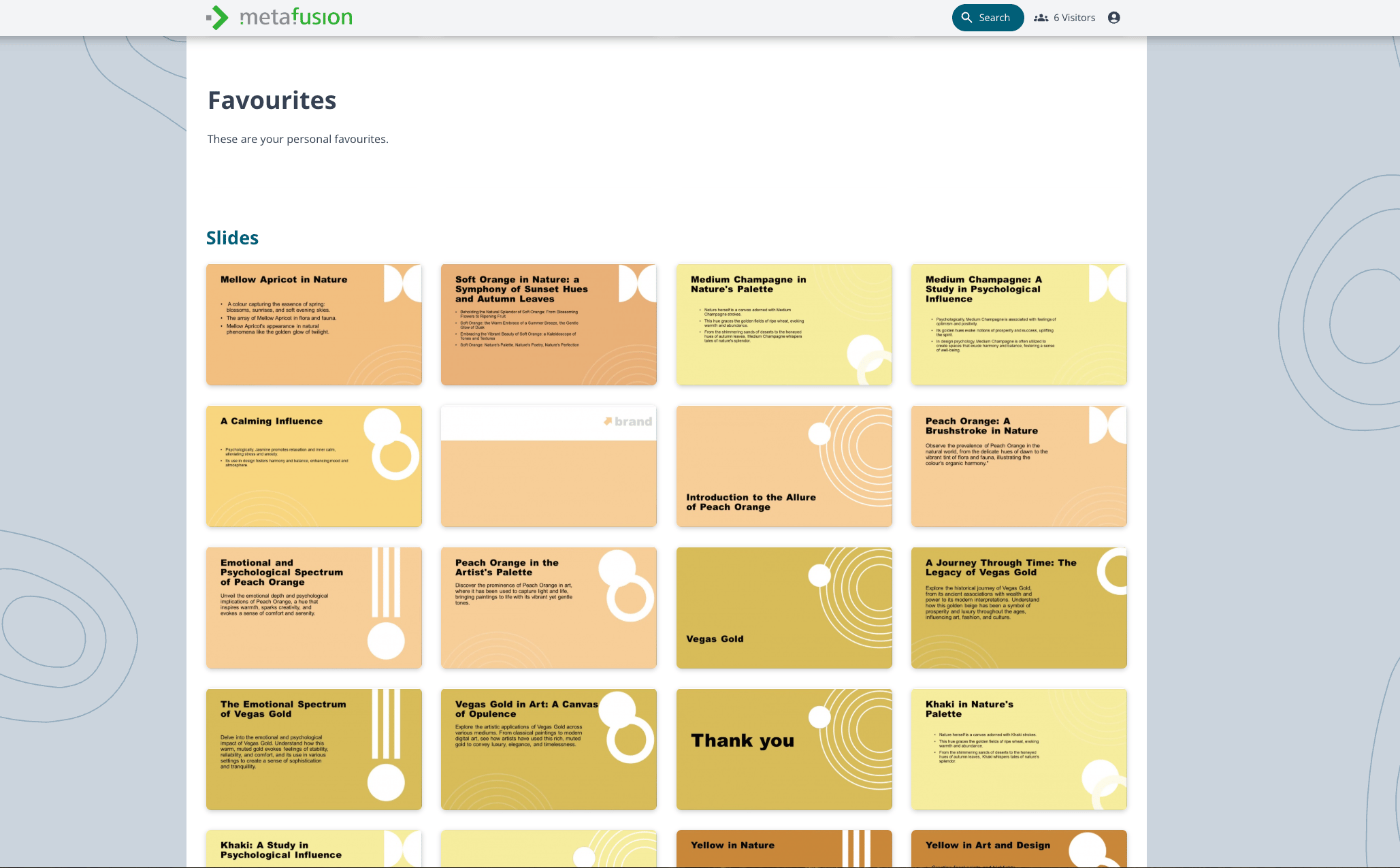
See all favourites (videos, posters, slides) in your account.
[Try the add to favourites](https://events.meta-fusion.com/showcase-form)
## Link to your own learning content within your platform
If you have a separate learning platform, it can be integrated into the 365 video platform. The major advantage is that this external content can also be found via the search function. This means you have everything available in one place and your users can draw on all the content. The external elements are then displayed as ‘Congress Resources’, just like other videos or slides.
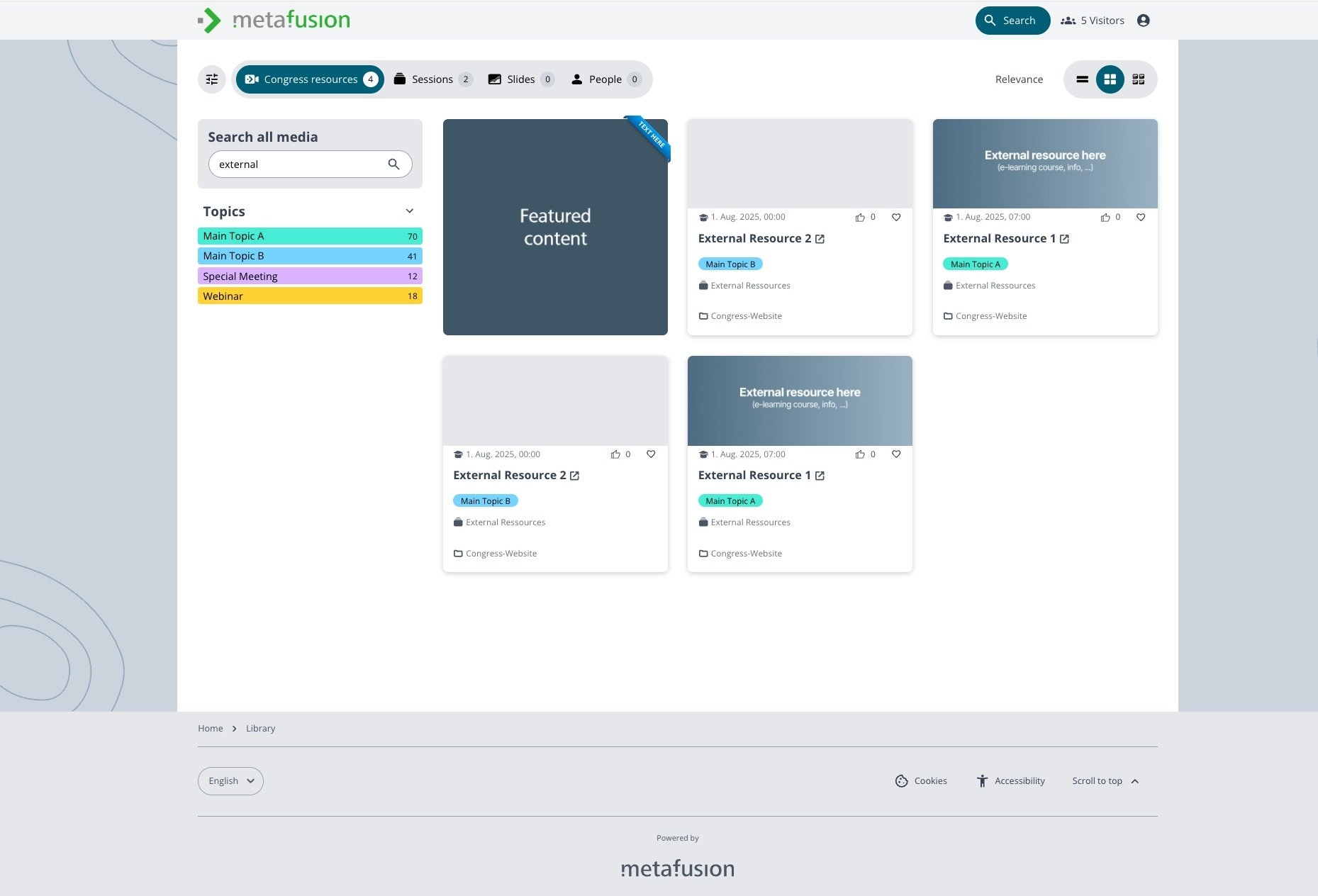
Link to external content. This is integrated in your platform and will be shown as content ressource.
[See how external ressources are embedded](https://events.meta-fusion.com/showcase-form)
## Offer your members CME credits
The 365 video platform is CME-ready. The analytics allow you to see exactly how long videos have been watched. This is the perfect foundation for offering this service to your members.
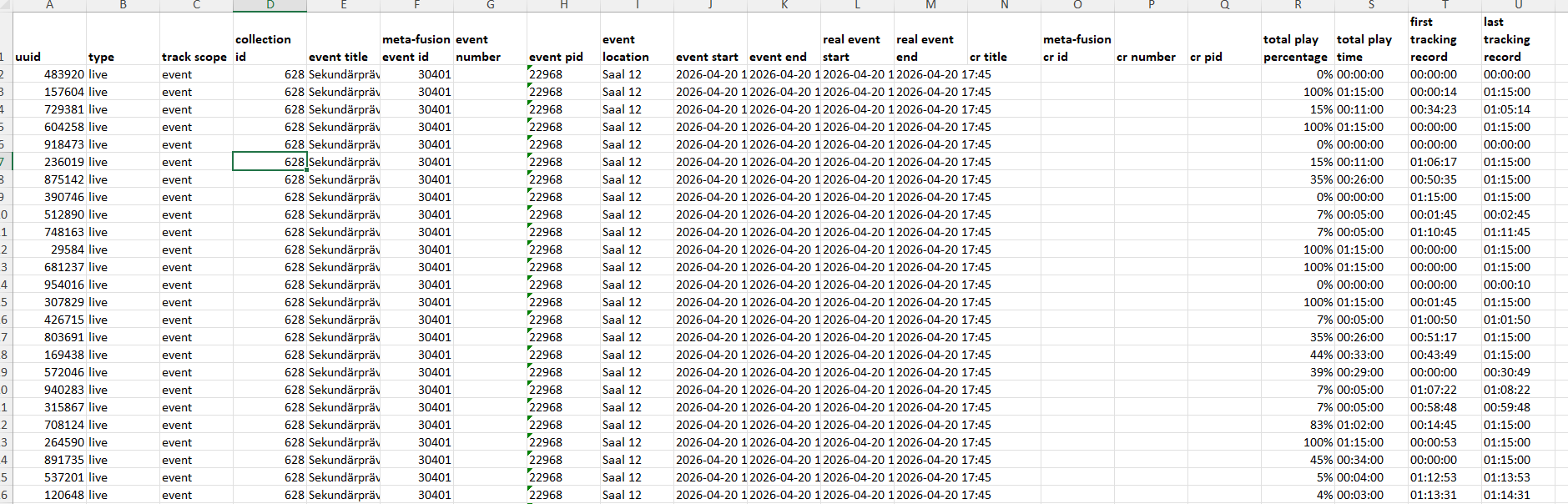
If you’re curious about how you can implement such features for your members to encourage greater engagement, we’d be delighted to advise you. Or take a look at the showcase of our ‘365 video platform’ featuring the AI-powered content video player.
[Try the fuctions in the showcase](https://events.meta-fusion.com/showcase-form)
### Get our newsletter
Share this
[Share on X](https://x.com/intent/post?url=https://news.meta-fusion.com/blog/content-that-lasts&text=Content+that+lasts) [Share on Facebook](https://www.facebook.com/sharer/sharer.php?u=https://news.meta-fusion.com/blog/content-that-lasts&t=Content+that+lasts) [Share on LinkedIn](https://www.linkedin.com/shareArticle?mini=true&url=https://news.meta-fusion.com/blog/content-that-lasts&t=Content+that+lasts)
Previous story
[← On-site Video Production – Which One Is Right for My Webcast Project?](https://news.meta-fusion.com/blog/on-site-video-production-which-one-is-right-for-my-webcast-project)
## You May Also Like
These Related Stories
[Why Choosing the Right YouTube Alternative Is Like Ordering Pizza](https://news.meta-fusion.com/blog/youtube-alternative-video-platform)

[Video Platform](https://news.meta-fusion.com/blog/tag/video-platform)
### Why Choosing the Right YouTube Alternative Is Like Ordering Pizza
Jan 29, 2025, 9:52:28 AM 3 min read
[The Legend of Lost Knowledge: The Rescuing Video Library](https://news.meta-fusion.com/blog/the-legend-of-lost-knowledge-rescuing-your-congress-videos-from-obscurity)

[Meeting Content](https://news.meta-fusion.com/blog/tag/meeting-content)
### The Legend of Lost Knowledge: The Rescuing Video Library
Feb 26, 2025, 2:08:59 PM 6 min read
[Event Website Optimisation: A Comprehensive Guide](https://news.meta-fusion.com/blog/event-website-optimisation-a-comprehensive-guide)

[Meeting Content](https://news.meta-fusion.com/blog/tag/meeting-content)
### Event Website Optimisation: A Comprehensive Guide
Jul 17, 2025, 12:27:49 PM 5 min read
### No Comments Yet
Let us know what you think
#### About the company
meta-fusion is the leading provider of digital congress solutions with more than 25 years of experience in producing webcast transmissions of conferences worldwide. We are dedicated to offering comprehensive hybrid meeting solutions and our very own digital congress platform the 365 video platform, which provides real added value for events and long-term usage of knowledge content. And we offer an intelligent video library - the solution for small clubs, AV providers and self-employed entrepreneurs.
[Solutions](https://www.meta-fusion.com)
- [Congress Content Digitalisation](https://www.meta-fusion.com/congress-content-digitalization)
- [Meetings & Event Webcast](https://www.meta-fusion.com/meeting-and-event-webcast)
- [Webinars](https://www.meta-fusion.com/webinars)
- [365 video platform](https://www.meta-fusion.com/365-video-platform)
- [Smart Video Library](https://www.meta-fusion.com/video-library)
- [Meeting Content Video Player](https://www.meta-fusion.com/video-player)
- [Small Associations](https://events.meta-fusion.com/video-library-for-associations)
- [Professional Congress Organiser](https://www.meta-fusion.com/video-library-for-pcos)
- [AV Provider](https://www.meta-fusion.com/video-library-for-av-suppliers)
[Products](https://events.meta-fusion.com/webcast-and-publishing-products)
- [On-site Video Production](https://events.meta-fusion.com/on-site-video-production)
- [Live Streaming](https://events.meta-fusion.com/live-streaming)
- [On-Demand Webcast](https://events.meta-fusion.com/on-demand-webcast)
- [Overflow & Digital Signage](https://events.meta-fusion.com/overflow-signage)
- Virtual Meeting & Webinar Production
- [Congress Website](https://events.meta-fusion.com/congress-website)
- [Webcast Microsite](https://events.meta-fusion.com/webcast-microsite)
- [Smart Video Library](https://www.meta-fusion.com/video-library)
- [Webcast Widget Hub](https://events.meta-fusion.com/webcast-widget-hub)
- [365-video-Platform](https://www.meta-fusion.com/365-video-platform)
- [Webinar Hub](https://events.meta-fusion.com/webinar-hub)
[Resources](https://news.meta-fusion.com/blog)
- [Blog](https://news.meta-fusion.com/blog)
[Company](https://www.meta-fusion.com/team)
- [Our team](https://www.meta-fusion.com/team)
- [Contact us](https://www.meta-fusion.com/contact)
- [IBTM 2025](https://events.meta-fusion.com/ibtm-2025)
- [Zukunftsforum Medizinkongress](https://events.meta-fusion.com/zukunftsforum-medizinkongress)
- [Backstage with meta-fusion](https://www.meta-fusion.com/backstage-at-a-congress)
[Pricing](https://www.meta-fusion.com/webcast_services_pricing)
- [Webcast and Services](https://www.meta-fusion.com/webcast_services_pricing)
Copyright © 2026 meta-fusion GmbH
- [Terms & Conditions](https://events.meta-fusion.com/terms_and_conditions_meta-fusion)
- [Privacy](https://events.meta-fusion.com/privay_policy_meta-fusion)
- [Imprint](https://events.meta-fusion.com/imprint)
- [AI-Statement](https://www.meta-fusion.com/ai-statement)
```json
{
"@context" : "https://schema.org",
"@type" : "BlogPosting",
"author" : {
"@type" : "Person",
"name" : "Britta von Oeynhausen",
"url" : "https://news.meta-fusion.com/blog/author/britta-von-oeynhausen"
},
"dateModified" : "2026-06-23T13:31:45.056Z",
"datePublished" : "2026-06-23T10:01:12.000Z",
"headline" : "Content that lasts",
"image" : [ "https://news.meta-fusion.com/hubfs/%C3%84rztin_mit_iPad.png" ],
"mainEntityOfPage" : {
"@id" : "https://news.meta-fusion.com/blog/content-that-lasts",
"@type" : "WebPage"
},
"publisher" : {
"@type" : "Organization",
"logo" : {
"@type" : "ImageObject",
"url" : "https://news.meta-fusion.com/hubfs/meta-fusion_Logo/mf_logopfeil_a_rgb.png"
},
"name" : "meta-fusion GmbH"
}
}
```